 ChatGPT
 Claude
 Perplexity
 Google AI
A Claude Skill Designs Your Whole Instagram Carousel — Then Hands You a Folder
Short answer: you can now generate a complete Instagram carousel with AI — the idea, the slide-by-slide structure, the copy, the palette, the fonts and ten exported images — using a Claude Skill, which is a package of instructions that teaches the model a fixed methodology. What none of these tools solve is the last step: you get a folder of PNGs on your machine, and posting them is still manual work. And there's a detail worth knowing before you generate: Instagram accepts up to 20 slides when you upload by hand in the app, but only 10 through the API. Ask for 15 and you've built something only you can publish, one file at a time.
I opened the video expecting another "look how pretty AI images are" demo.
I stayed for minute 14.
The channel is Ruva IA — just under 21,000 subscribers — and the video, "Construí una Skill de Claude que diseña tus Carruseles de Instagram," has passed 57,000 views since April (YouTube's own count, checked 28 August 2026). Nineteen minutes, in Spanish, and he gives the skill away. So far, standard tutorial territory.
What's inside it isn't standard.
The original video from the Ruva IA channel (Spanish, 19 minutes). We are not affiliated with the channel or the skill.
What does a Claude Skill for carousels actually do?
It doesn't generate an image. It runs a methodology.
A Skill, in Anthropic's own definition, is a modular package of instructions and resources that Claude loads on demand — a file containing the procedure, plus whatever assets that procedure needs. You install it once (in the web app: Settings → Skills, drag the file in), and from then on Claude knows how to do that thing without being told again.
The difference from a long prompt is that a prompt has to be pasted back in every time. A skill stays.
And this one doesn't open by asking "what image do you want?" It opens by asking about your brand. The flow he demonstrates runs, in order: brand discovery, visual system, brand voice, carousel brief, big idea, slide-by-slide structure, final copy, HTML, and only then the PNGs.
Nine steps before it draws anything.
He tests it on a fictional client — a sports nutritionist — and the back-and-forth is the interesting part. Claude proposes two visual systems with different palettes, recommends one, and gives three reasons why. Then it asks whether there are real photos to work with or whether the slides should go fully typographic. Then it negotiates the big idea: proposes three, he rejects two.
That's the conversation a designer normally has with a client. Packaged into a file.
The moment it won me over
It wasn't the design. It was Claude telling him no.
He feeds it a logo he grabbed off the internet for the fake client, and Claude tells him flatly that it's a generic stock icon, that it still has a Freepik watermark visibly on it, and that this won't work. It suggests a typographic wordmark instead.
He laughs and takes the note.
Small detail, and it's the one that mattered most to me. A tool that approves everything you give it isn't helping you, it's flattering you. Building "tell the user when the material they brought is bad" into the methodology is the difference between a generator and something that behaves like judgment.
The same thing happens with layout. The model notices on its own that text on two of the slides broke onto a second line when it should have been one, and fixes it. Nobody asked.
Does it hold up outside a demo? I ran it on my own account
I downloaded the skill and pointed it at a project of mine that has nothing to do with any of this: winery-hotels.com, a directory of hotels on working vineyards, and its Instagram account @wineryhotels.
I used to build the carousels by hand, template by template. Every post came out close to the last one but never the same: a different title face, a different size, the hotel's details in a different spot.
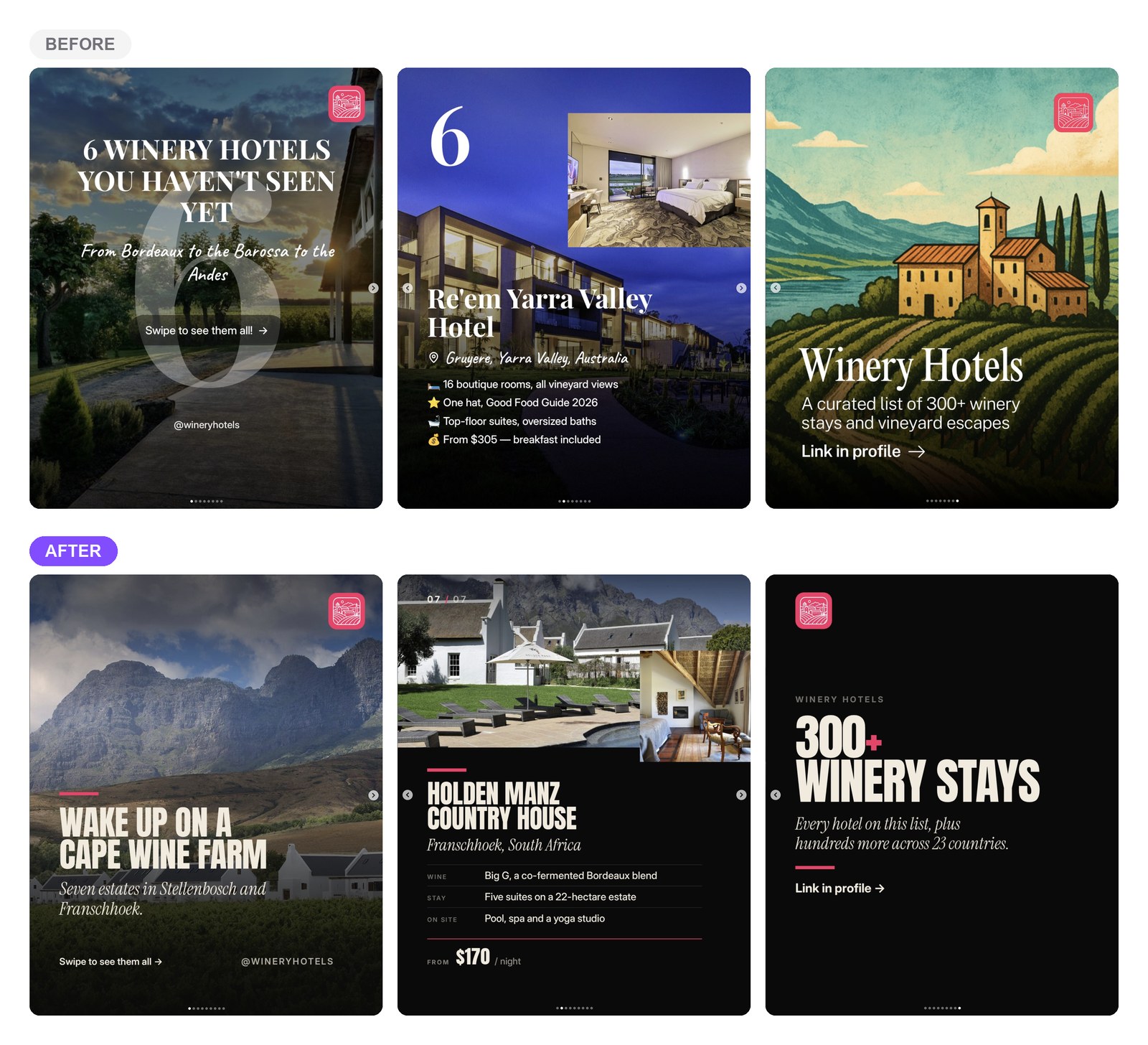
On top, three slides from the old method — cover, hotel card, closing slide. Below, the same three slide types after the skill: one type family, one fixed accent colour, the hotel's details always in the same place in the frame.
The real difference still doesn't show in a single post. It shows in the grid, which is the first thing anyone landing on the profile actually looks at.
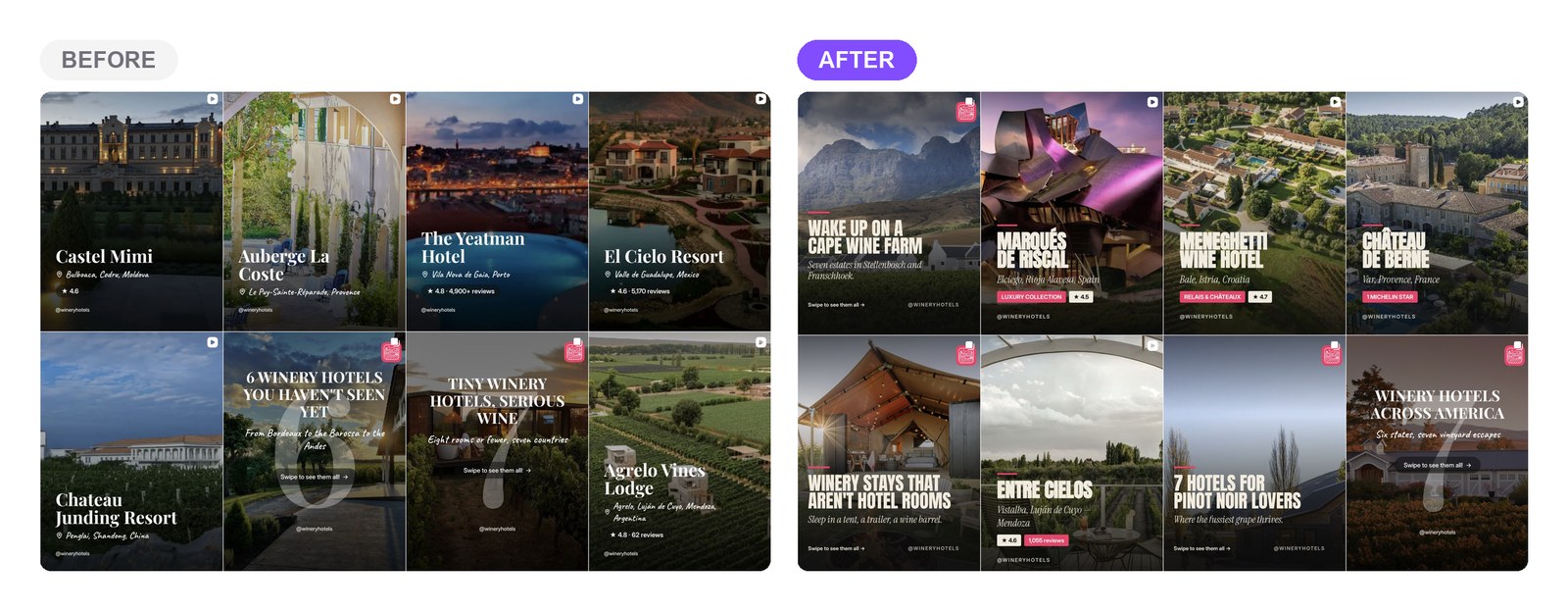
The part worth underlining is where that system came from: the brand discovery phase, not me picking fonts post by post. You do that once.
Where does the video end? At a folder
This is the part that made me write this.
The final output is ten PNGs in a folder on your computer, plus an HTML file to preview the carousel in a browser. He notes in passing that this HTML is something only you will be able to view — an honest aside, and the right one.
So: the system did the hard part, the part that needs taste, and leaves you standing in front of the dumb part. Open your phone, move the files over, order them by hand, retype the copy into Instagram's caption field, pick a time.
Ten slides, one at a time, in the right order. Every week.
And if you run more than one account, or you're an agency, multiply that.
None of this is a knock on the skill. It does exactly what it promises and does it well. It's that generation and distribution are two different problems, and solving the first one leaves the second more exposed, not less.
Why 10 slides and not 15?
Because the API has a ceiling, and it isn't the same one the app has.
This is worth knowing before you brief the model, because it constrains what you should ask for:
- Uploading by hand in the app, Instagram lets you build a post with up to 20 photos and videos.
- Publishing through the API — meaning any scheduling tool, or any agent — the cap is 10 items per carousel, and the whole carousel counts as a single post.
The ten the skill proposes by default land exactly on the limit. Almost certainly not a coincidence — but the video mentions you can ask for as many slides as you like, and that's the trap. Ask for fifteen, get fifteen, they look great, and then find out no automated tool can publish that carousel. Only you can, by hand.
There's a second gotcha of the same kind: Meta's documentation states that JPEG is the only supported image format for publishing through the API. The skill exports PNG. In practice plenty of PNGs go through anyway, but it's worth having on your radar before you queue ten slides and meet the problem at 9am on publishing day.
How do you publish an AI-generated carousel without touching it?
By handing the files to the same agent that made them, instead of downloading them.
This is where PosteAhora comes in, and I want to be precise about what it does and doesn't. Ruva doesn't use PosteAhora in the video and doesn't mention it — his skill solves design, full stop. What follows is how to close the step his skill leaves open, using the tool I build.
PosteAhora exposes an MCP server, so the same Claude that built the carousel can call a small set of actions without leaving the conversation. The concrete flow is three verbs:
upload_media— push the ten PNGs up, get back URLs hosted on our CDN.media_import_urldoes the same job if the files already live somewhere public.list_accounts— the agent asks which connected account this is for, because "post to Instagram" and "post to which of your three Instagram accounts" are different instructions.schedule_post— hand it the URLs inmediaUrls, the caption it already wrote, a date and time, and it lands in the queue.
Nothing publishes without you seeing it. It arrives in your queue as a scheduled post, where you can edit it or kill it.
Back to my own account: the daily @wineryhotels carousel now starts as a scheduled task. The agent picks the day's theme without repeating recent ones, checks each hotel's rate and details against my database before writing them onto a slide, builds the carousel and leaves it scheduled. I review it.
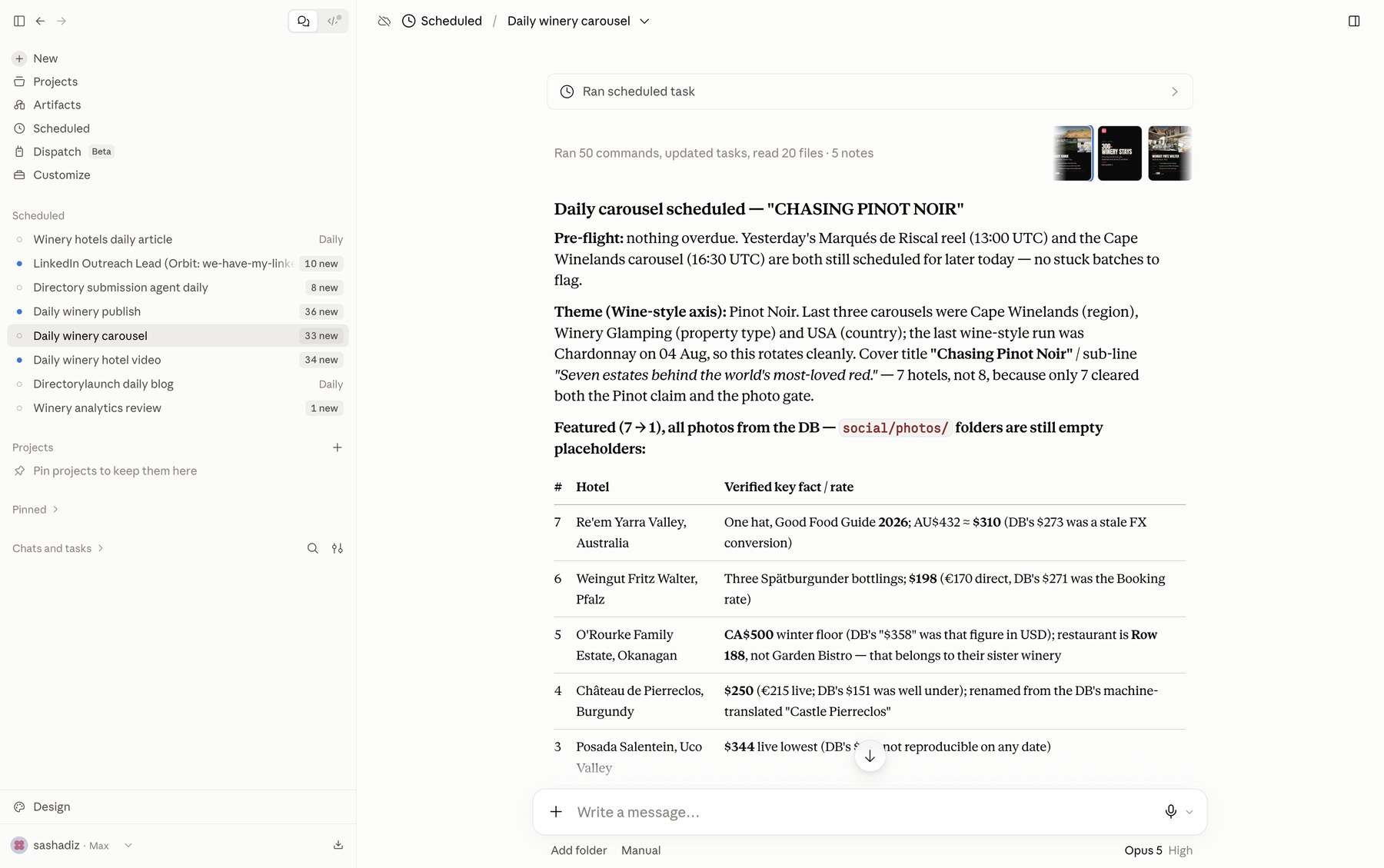
That's the step the video leaves open, closed.
Two things that matter specifically for this case:
We enforce the 10-item cap ourselves. Send eleven items to an Instagram carousel and the operation fails on our side with a readable error, rather than halfway through against Meta with a numeric error code. Fewer than two isn't a carousel either — Instagram requires a minimum of two.
4:5 is supported. It's the ratio that performs best in feed because it eats more vertical screen, and it's what these skills tend to export. Instagram also takes 1:1, 3:4 and 1.91:1 — verified against a live account, because Meta's published spec is out of date on this particular point.
And since you already have ten images: the same files fit a TikTok photo carousel (which allows up to 35) and a LinkedIn multi-image post (up to 10). One set of assets, three networks, one queue.
Is this whole workflow worth it for one carousel?
For one, no. For the twentieth, it's the only way.
That's the trap in evaluating automation with a single example. The first carousel always looks faster by hand, because setting anything up costs something. What changes the math is repetition: brand discovery happens once, and every carousel after that starts from an identity the agent already knows.
Ruva says something along these lines that I think is the most useful observation in the video — the first time is tedious because you're teaching it, and after that it's easy.
Same logic on the publishing side. You connect the accounts once.
What I'd actually do if you're starting today
One thing at a time, not three.
Install the skill and take one carousel all the way through by hand, manual upload included. It will hurt in exactly the spot it's supposed to hurt, and then you'll know whether your problem is design or distribution. If design was never your bottleneck and publishing is what grinds you down, do it in the other order: automate the queue first, the design second.
One warning that isn't mine but Anthropic's, and it applies to any skill you download from anywhere, this one included: only use Skills from trusted sources and read what's inside before installing, because a skill grants Claude new capabilities on your own machine. Ruva's is public and he walks through it on camera step by step, which is more than can be said for most. Open the file anyway.
Got the slides and just need them out the door? Connect your accounts on PosteAhora and let the same agent that designed the carousel drop it straight into the queue. Free trial, cancel whenever.
FAQ
Can AI create a full Instagram carousel?
Yes, including the judgment work and not just the images. With a Claude Skill like the one in the video, the model runs brand discovery, defines a visual system, writes the copy slide by slide, and exports the final images by generating them in code. What AI doesn't do on its own is publish them — the output is files on your computer, and getting them onto Instagram is a separate step that needs either a publishing tool or manual work.
How many images can an Instagram carousel have?
It depends how you publish, and the gap is significant. From the app, uploading by hand, Instagram allows up to 20 photos and videos in a single post. Through the API — any scheduler, agent or automation — the maximum is 10, and the whole carousel counts as one post against your account's publishing limits. If you plan to automate, brief the AI for 10 slides maximum.
What is a Claude Skill, and how is it different from a prompt?
A Skill is a package of instructions, and optionally scripts and reference files, that Claude loads automatically when your request matches what the skill knows how to do. The practical difference from a prompt is permanence and scope: a prompt lives in one conversation and has to be repeated, while a skill stays installed and triggers itself. It can also carry resources — fonts, templates, visual references — that a text prompt simply can't.
Can an AI agent schedule an Instagram carousel?
Yes, through Instagram's official publishing API, with two conditions. The account has to be a professional one (business or creator) connected to the app with content-publishing permissions. And the agent never touches your account directly — it calls a scoped set of actions inside the publishing tool you already authorised. With PosteAhora that's three steps: upload the files, pick the account, schedule. The post waits in your queue for review before it goes out.
What format should the slides be exported in?
4:5 (1080 × 1350) if you want maximum vertical space in feed — and check the file format while you're at it. Meta's documentation states JPEG is the only image format its publishing API supports, while most of these skills export PNG. Instagram also accepts 1:1, 3:4 and 1.91:1 in feed, so cropping isn't the risk here. The file format can be.
Does the same carousel work for TikTok and LinkedIn?
The files do, the copy doesn't quite. TikTok supports photo carousels of up to 35 images and LinkedIn takes multi-image posts of up to 10, so the same slide set fits all three networks without regenerating anything. What's worth adapting is the text: the hook that lands on an Instagram carousel is rarely the one that opens well on LinkedIn. An agent can rewrite that per network in the same pass where it builds the queue.