 ChatGPT
 Claude
 Perplexity
 Google AI
Claude + Higgsfield: The Full Setup for a Daily, Self-Writing Instagram Carousel

Jason Lee runs an account that posts daily AI-news carousels on Instagram — the format everybody in the AI-content space has seen by now: a cover slide with a hook, two or three slides of substance, a "follow for more." What he documented in his video, "How I Use Claude to Automate 99% of Content Creation", isn't the format itself. It's the fact that he no longer makes these carousels — Claude does, end to end, and Jason's part of the job is approving what shows up when he wakes up.
The setup only needs two tools talking to each other: Claude as the "architect" that researches, writes, and directs, and Higgsfield as the image and video engine it calls through an official MCP connector. Neither tool alone gets you here. It's the connector between them — and one saved Claude Skill — that turns "generate an image" into "run my content pipeline."
The two tools, and why the connector is the actual unlock
Claude doesn't have its own image generation model. Higgsfield does — more than 30 of them, including current top models, all under one subscription instead of separate accounts for each. On its own, that's just "another image tool." What makes it part of an automated pipeline is that Claude has an official MCP connector to Higgsfield: instead of writing a prompt, opening Higgsfield, generating, downloading, and re-uploading into your post, Claude sends the prompt directly through the connector and the image comes back inline, in the same conversation. Jason describes the setup itself as two steps — open Higgsfield, go to MCP, copy the connector URL; open Claude, go to Settings → Connectors, add it as a custom connector named Higgsfield. That's the entire infrastructure requirement.
Connecting Higgsfield to Claude as a custom MCP connector — the entire setup is copy a URL, paste it, sign in.
Building the hook slide, one plain-English correction at a time
The first slide is the one that has to stop the scroll, so Jason treated it as its own small project: "create an image for the first slide of a young woman sitting down having breakfast in her house, reading a story on a newspaper, and I want the topic of the story as a headline on the newspaper." The first result was close but wrong — off-brand font, no mascot. Rather than rewriting the prompt from scratch, he corrected it conversationally: fix the font, add the mascot, move it to an overlay near the bottom. Two more iterations later, he had the exact style he wanted — and asked Claude to save it as a skill, so every future story reuses the same layout, font, and mascot placement automatically.
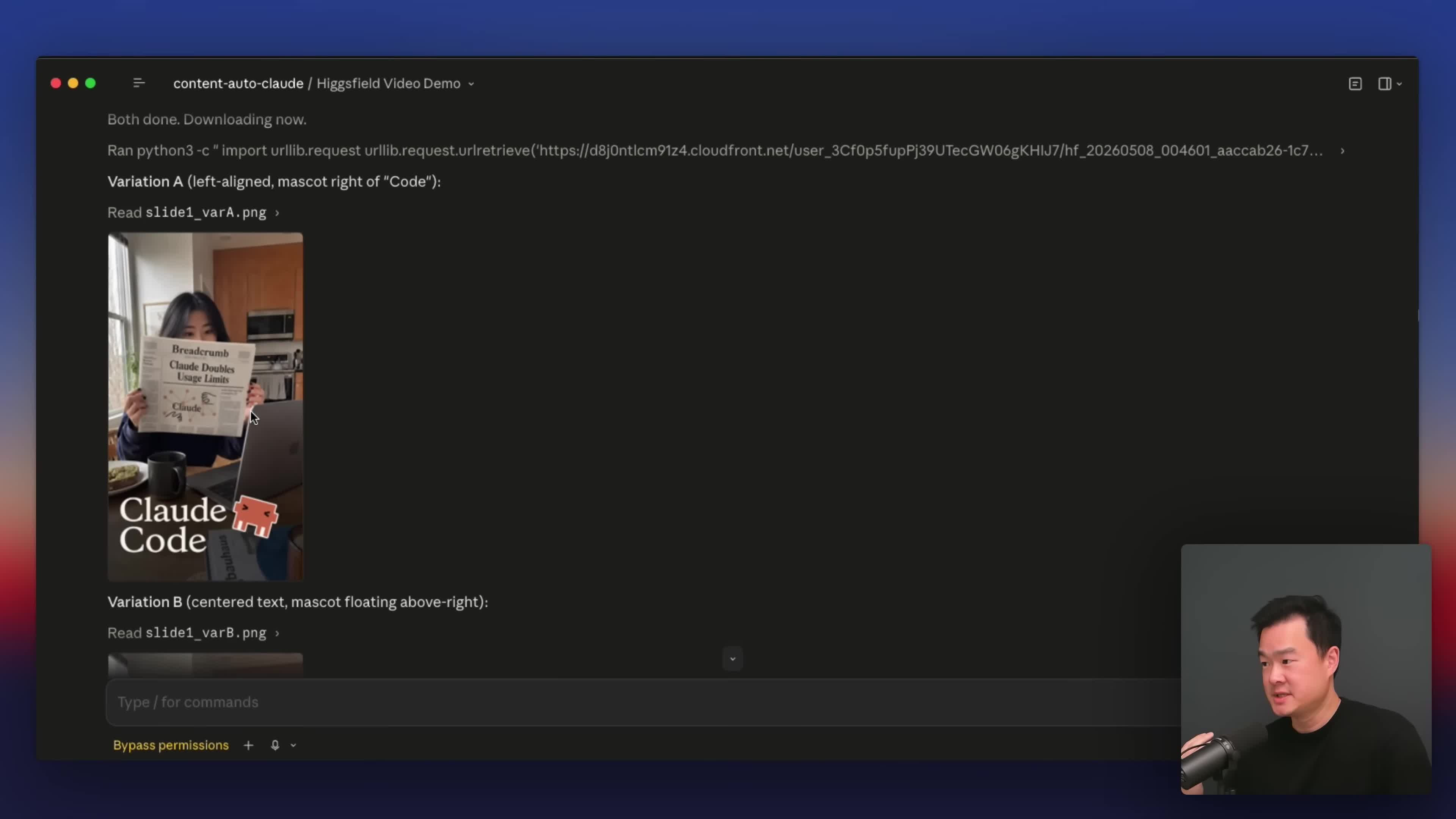
That loop — generate, correct in plain English, lock it in as a reusable pattern — is what makes each new story take minutes instead of a fresh design pass every time.
The content slides pull real screenshots, not just summaries
For slides two and three, Jason gave Claude a reference layout he liked and asked it to drop the story summary into that format — but before generating anything, Claude shows him the actual text first, so he can approve or edit the copy before it ever becomes an image (this also saves regenerating images over wrong text). What's notable is where some of the visual material comes from: for one slide, he asked Claude to open the original source post in a browser, screenshot just the post itself, and hand that screenshot to Higgsfield to compose into the slide. That requires enabling Claude's browser use and installing the Chrome extension, but it means the carousel includes the actual post it's summarizing — with real view counts, not a generic mockup.
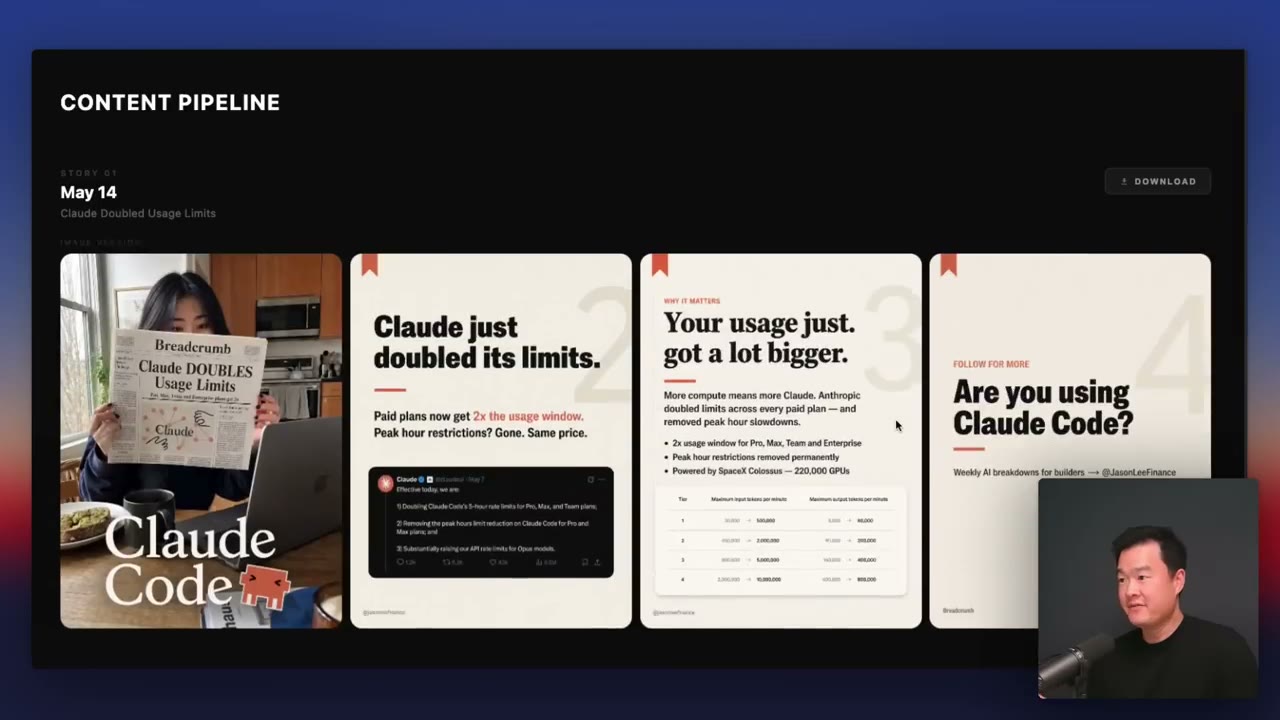
He also has Claude vary small details automatically — swap coffee for a smoothie, change the shirt color — specifically so consecutive carousels don't look like the same template reused, without having to think about it each time.
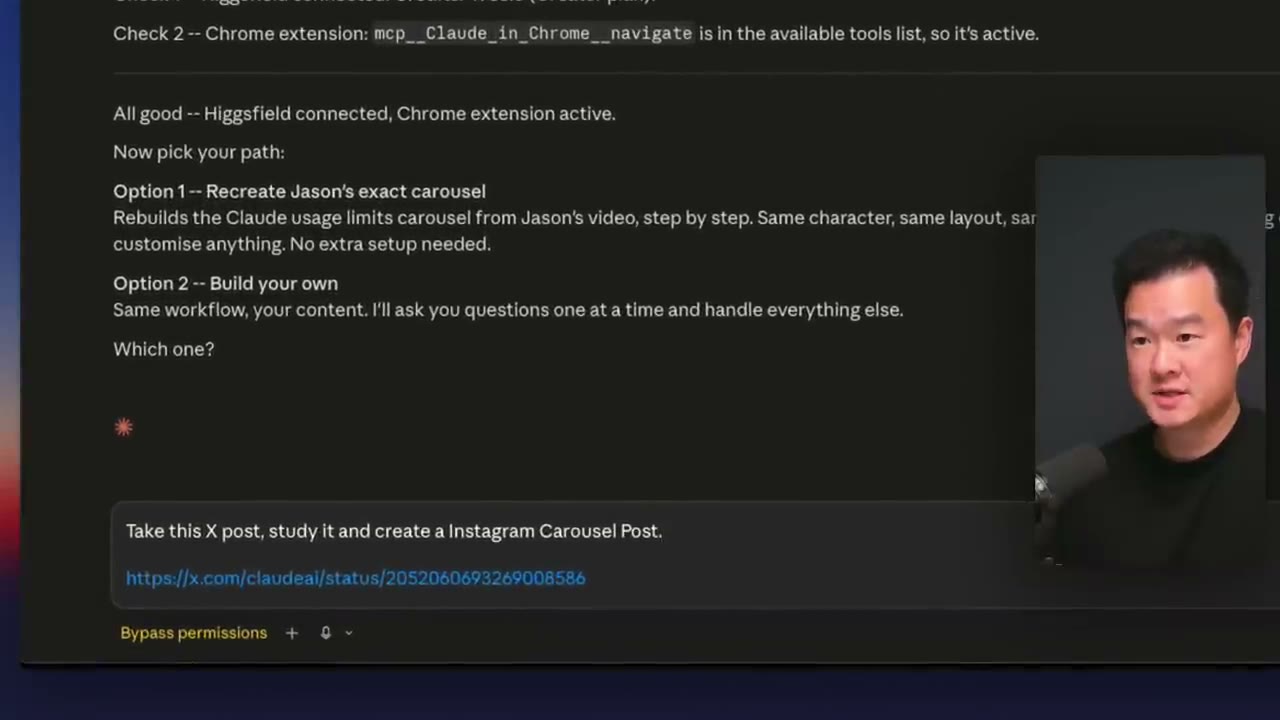
The whole loop in one prompt: "Claude, take this post, study it, and create an Instagram carousel post" — a URL, and a few minutes later the carousel is ready to review.
Confirm before you build — the step that saves tokens and rework
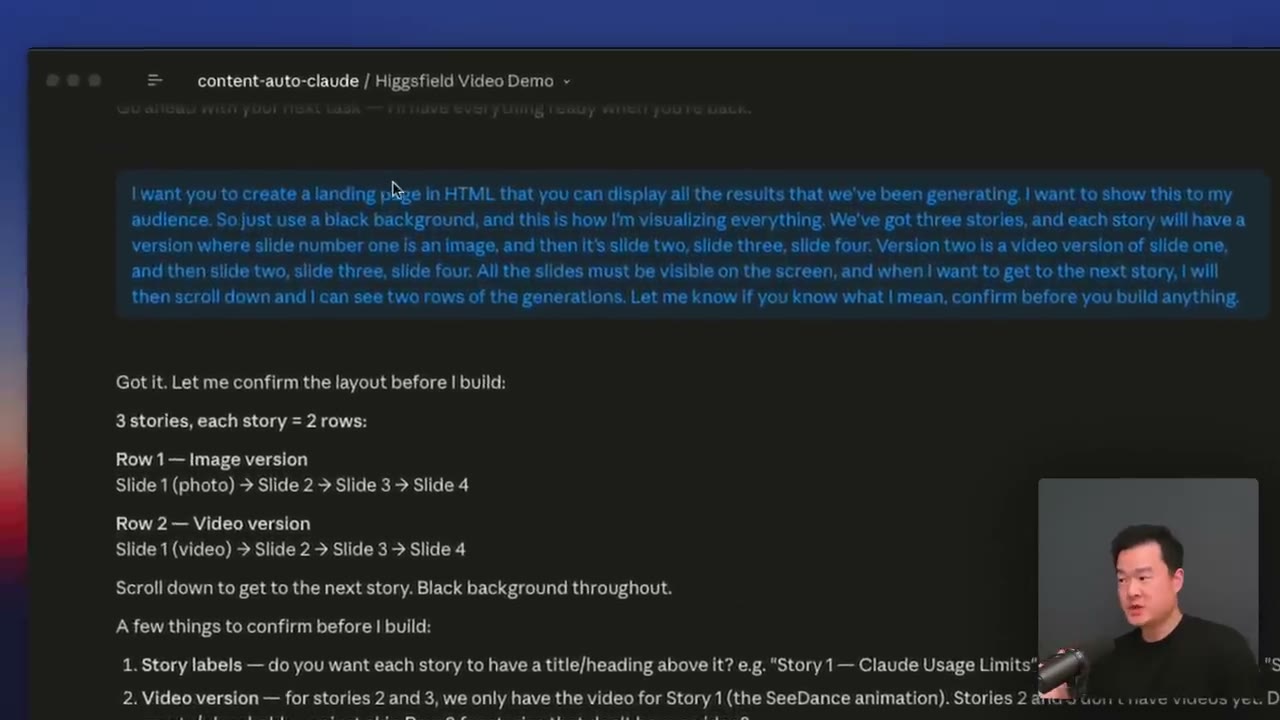
When Jason asked Claude to build a local landing page to review every generated carousel (instead of scrolling a long chat to find old images), he added one instruction that's easy to skip and worth copying: "let me know if you know what I mean, and confirm before you build anything." Claude came back with an explicit breakdown — story labels, how many rows per story, slide sizing — before writing a line of code. That confirmation step does two things: it catches misunderstandings before they cost a regeneration, and it's cheaper than generating the wrong thing and iterating from there.
Packaging it as a Skill — the recipe, not the one-off
Once the visual style was locked in, Jason turned the whole process into a Claude Skill: a markdown file with the exact instructions for how to research a story, structure the slides, and call Higgsfield with the right prompts and settings. A Skill is what lets "run carousel skill" reproduce the same workflow every time instead of re-explaining it from scratch in every new chat — and it's also what makes the whole thing shareable: Jason distributes the skill file for free so viewers can drop it into their own Claude folder and either recreate his exact carousel or adapt the same underlying workflow to different content entirely.
The automation: a Routine that runs before you wake up
The last piece is what turns this from "a fast way to make one carousel" into "a system that runs itself." In Claude's sidebar, under Routines, Jason created a new local routine, gave it a name and description, and pasted in instructions that tell it exactly what to do unattended: check a specific X account for posts from the last 24–48 hours, compare against previously processed stories to avoid duplicates, and if there's something new, run the full carousel skill against it.
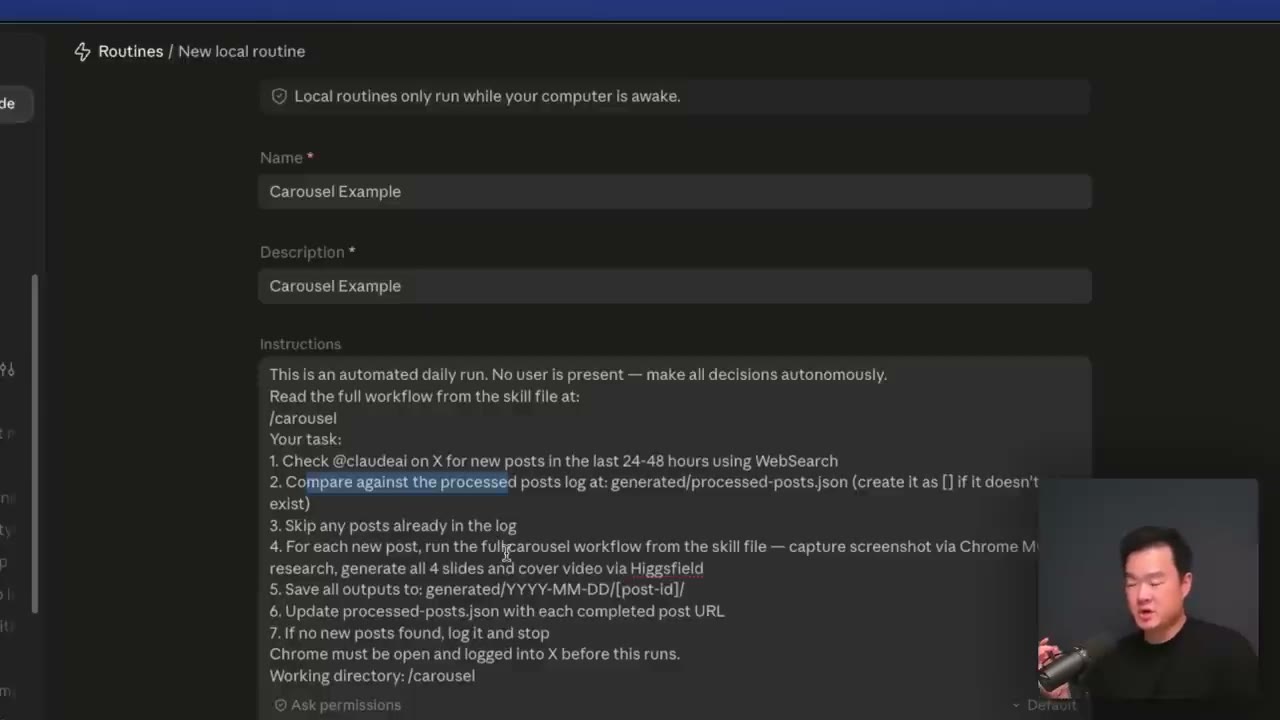
The Routine setup: name, description, and a full unattended instruction block — check the source account, dedupe against a processed-posts log, run the carousel skill on anything new.
He sets the schedule to 7 AM daily, and — critically — sets permissions to bypass, so the Routine doesn't stall waiting for an approval that will never come while he's asleep. By the time Jason wakes up, the carousel is generated and sitting on his local landing page, ready for a single human decision: approve, or don't.
What the publishing step looks like with PosteAhora
Jason's system stops at "the carousel is ready on my landing page" — publishing to Instagram is still a manual click in his workflow. That's exactly the gap PosteAhora's MCP closes without adding a second system to babysit: the same Claude session that generated the carousel through Higgsfield can hand the finished slides straight to PosteAhora and either publish or queue them as a draft for review, using the same plain-English instructions Jason already gives Claude for everything else.
list_accountsresolves theaccountIdfor the Instagram account the carousel is for — the same explicit-target principle Jason's own routine follows (it never guesses which account to post to).- Each generated slide gets uploaded through
upload_mediaorcreate_upload_url, and the resulting URLs go straight intomediaUrls— the images never leave the agent's hands to get manually downloaded and re-uploaded, which is the exact friction Jason built the MCP connector to avoid in the first place. create_postwithstatus: "draft"reproduces Jason's own review gate: the carousel sits ready, exactly like his local landing page does, and a human approves before it goes live — orschedule_postif the routine should queue it straight into the daily slot without a manual publish click at all.
The difference from Jason's setup isn't the logic — it's that the last mile (getting pixels from "generated by the agent" to "live on Instagram") doesn't require a landing page you built yourself and a manual click every morning. The same Routine that already checks for new stories and calls Higgsfield can call PosteAhora next, and the loop closes without you touching anything.
What's worth copying even if you don't build the whole pipeline
You don't need the Routine or even the MCP connector to take something from this. The most transferable habits:
- Correct in plain English, then save the result as a reusable pattern. Iterating on a single image and then locking in the winning style as a Skill is what makes carousel #2 take five minutes instead of thirty.
- Ask the agent to confirm its understanding before it builds anything expensive. One clarifying question costs nothing; one wrong generation costs a regeneration and your patience.
- Give the agent a "no user present" mode. Jason's Routine instructions explicitly say "make all decisions autonomously" — that's what lets it run at 7 AM without stalling on a question nobody's there to answer.
Why this matters for teams posting in Spanish or Portuguese
Nothing about this pipeline is English-specific — the source account, the prompts, the summarized copy can all be in Spanish or Portuguese with zero change to the mechanic: research a source, generate slides in a locked visual style, review, publish. What Jason built by hand (the landing page, the manual Instagram upload) is exactly the piece PosteAhora already covers for any language and any of the platforms your LATAM audience is actually on — Instagram, TikTok, LinkedIn — from the same agent that's already doing the research and image generation.
Already have an agent generating content but still publishing it by hand? Connect PosteAhora and let the same Claude session that builds the carousel schedule it too.
Original system and video by Jason Lee — full walkthrough: "How I Use Claude to Automate 99% of Content Creation (Full Guide)".